Eliminating FUD with Peak Sniper: The trading bot for crypto market exits


In fighting FUD (fear, uncertainty and doubt), the Peak Sniper trading bot could be your new best friend. In this article. we'll introduce trading bots and provide an overview of Peak Sniper, its advantages, and how to access the bot with OKX.
A short intro to trading bots
Trading bots on OKX are valuable tools that can help you diversify your portfolio and achieve your trading goals. A trading bot is a software program that automates your trades based on predefined algorithms and strategies.
By leveraging the power of these bots, you can take advantage of market opportunities and manage risk effectively. When selecting a trading bot on OKX, it's essential to consider your trading goals, risk tolerance, and time horizon.
If you're a conservative or beginner trader, bots like Spot DCA (Martingale) or Recurring Buy can gradually accumulate assets and minimize exposure to market volatility. These bots are suitable for long-term positions and low-risk strategies.
For more aggressive traders willing to take on higher levels of risk, bots like Futures Grid or Infinity Grid can be a good fit. These bots use advanced algorithms to analyze market data and execute trades based on real-time price movements. They allow you to capitalize on short-term price fluctuations and maximize profits.
Choosing the right trading bot that aligns with your trading style and preferences is essential. Evaluate the bot's performance history, features, and functionality to ensure it meets your needs.
By using the right trading bot and implementing a well-planned strategy, you can diversify your portfolio and optimize your trading techniques.
Overcome FUD on your crypto-selling journey with Peak Sniper
Finding the right price at the right time to exit the market can be time-consuming, and we often see prices drop before we get the chance to sell. This creates FUD and may cause you to sell lower than your target sell price. You can always place a limit order above the market price, but if the price moves against your target, you may not be able to sell anything at your target price. And this is where Peak Sniper comes to the rescue.
Peak Sniper ensures that a proportion of your order will be executed at the price you set on the order's expiry. You will no longer have to regret missing out on a better price or not trading earlier.
Peak Sniper helps to alleviate volatile market conditions. For instance, if you placed a sell order with Peak Sniper for 1 BTC at $25,000 when the price was $22,000, Peak Sniper would ensure that part of your order will still be filled at your target price on the order's expiry even if the price goes the other way. Without Peak Sniper (if you had placed a regular limit order), you wouldn't be able to sell anything.
As you can see, the mechanics of the Peak Sniper is simple. Here are some of its key features to keep in mind:
- Once you complete an order, the position’s funds are locked. You will not be able to cancel the order and withdraw the funds before the order’s expiration date.
- The guarantee ratio will depend on your target price and on the current market price. The further away your target price is from the current market price, the smaller the percentage will be – all the way down to zero. A limit message will pop up if you input a price outside of the acceptable range. So, no, we won’t guarantee you can sell BTC at $100,000 during a week when it trades around $25,000. 🙃
- The bot only observes the expiry price. If the market moves above the target price but then goes back below it, the Peak Sniper will only sell the percentage of the target price target that was originally set.
Peak Sniper only supports BTC and ETH. Last but not least, users can use it without paying any transaction fees.
- To access Peak Sniper, you can tap "Trading" and then "Trading Bots." You will then reach our "Bot Marketplace."
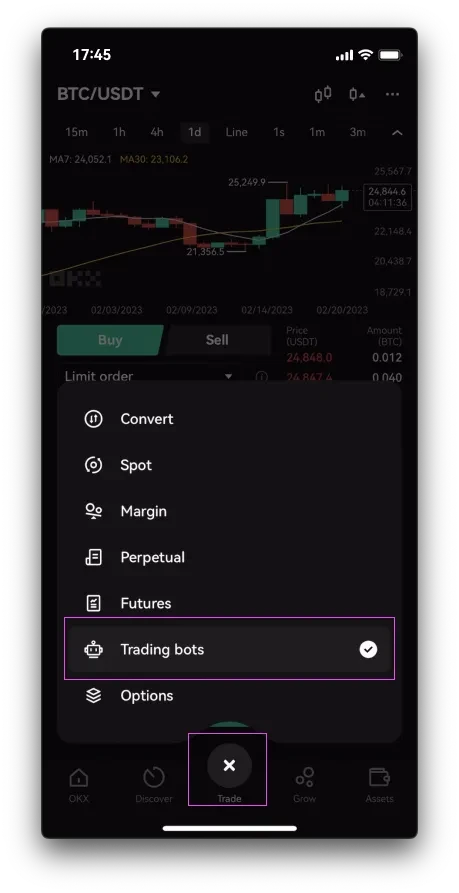
- Scroll down until you see "Arbitrage Bots" and tap "Peak Sniper."

- Select the recommended strategy card or tap "All" to view more. Pick the option that suits your desired needs. Customizing your own parameters is also possible by tapping "Customise".
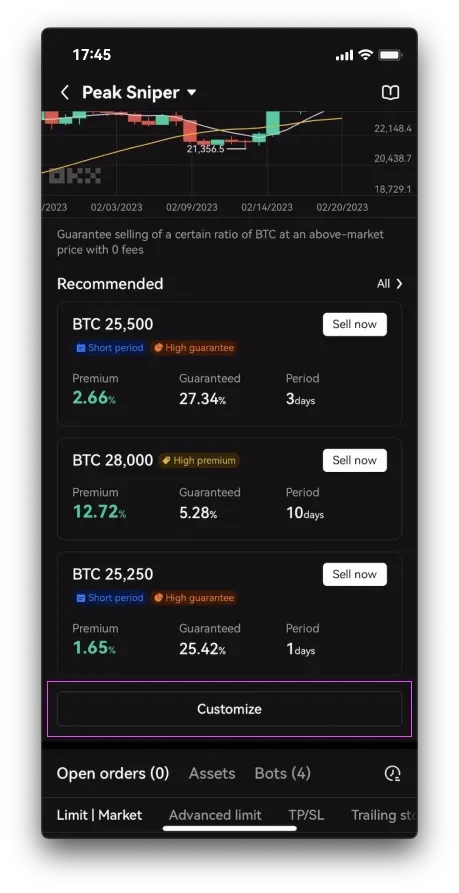
- Enter the amount you want to sell, and select the expiration date. The guaranteed ratio will change based on price and expiry. When you’re ready, tap “Sell BTC at Peak". and confirm the order. Your order will be confirmed and funds will be locked up until expiry.


How to use Peak Sniper on a desktop browser
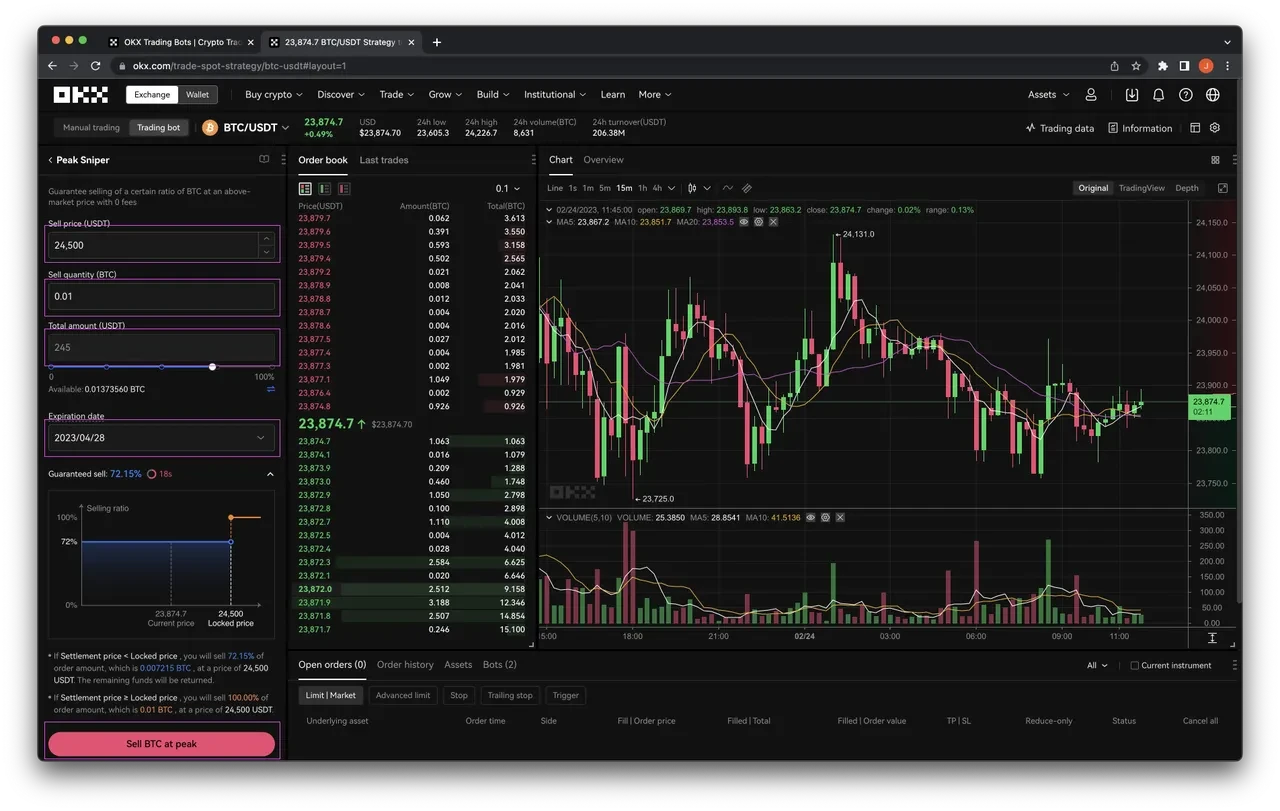
- To access Peak Sniper on your desktop browser, navigate to our Bot Marketplace. To do so, hover to trade at the top menu and tap "Marketplace."

- Then, tap "Peak Sniper" from the "Arbitrage Bots" menu.
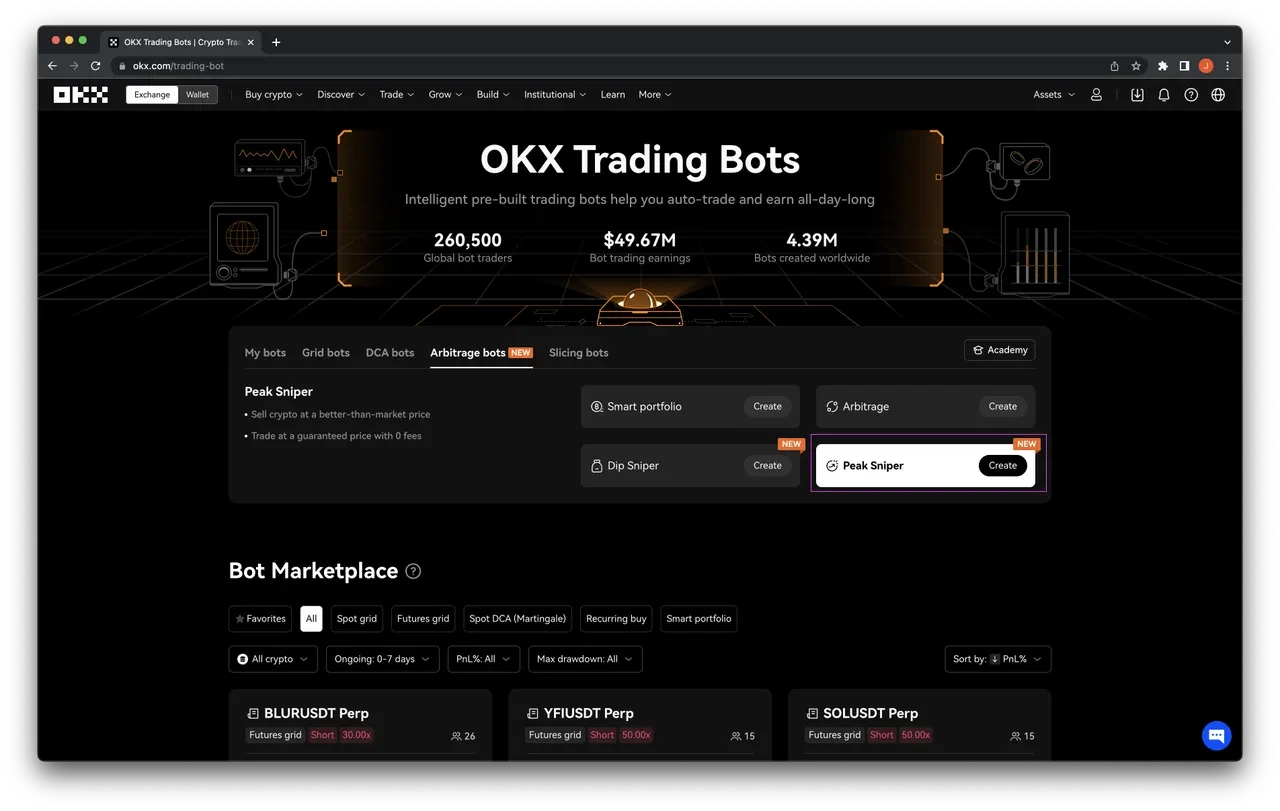
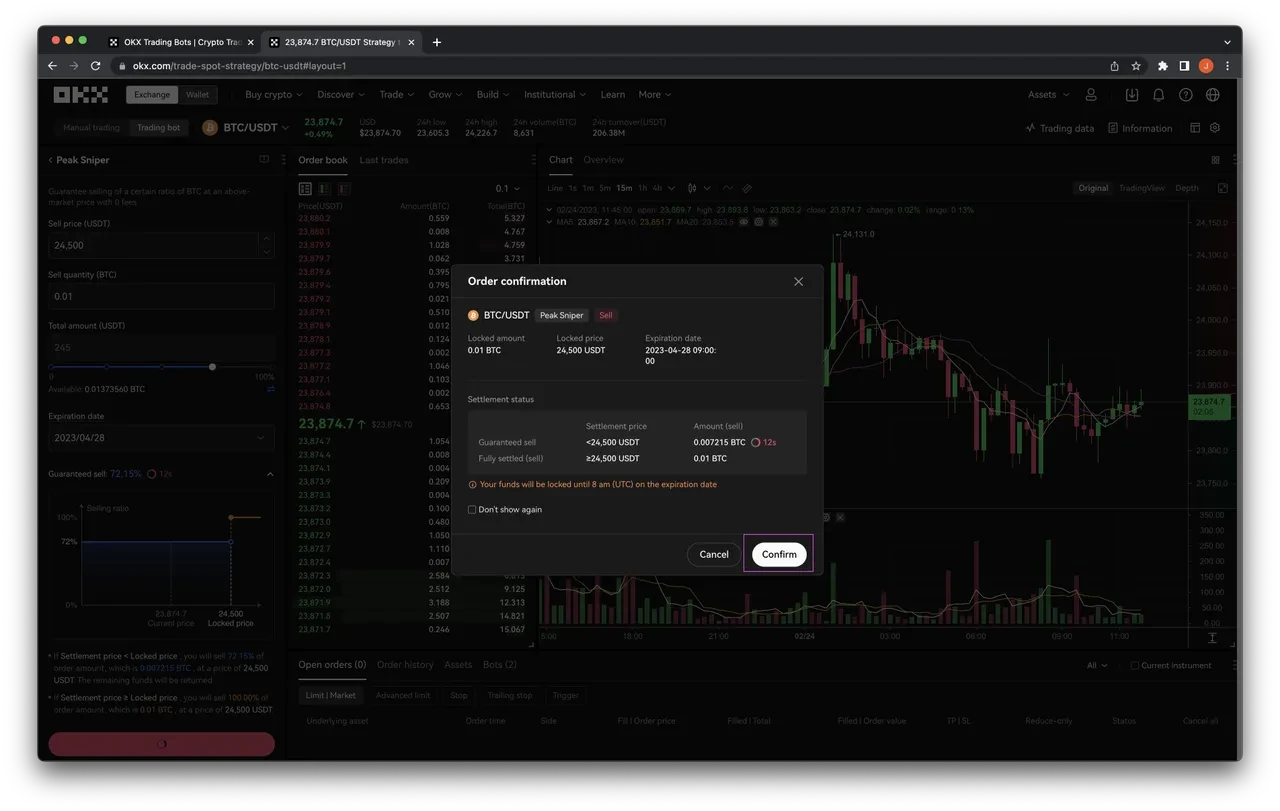
- Enter the target price and amount you want to sell and select the expiry. The guaranteed ratio will change based on price and expiry. When you’re ready, select “Sell BTC at Peak" and confirm the order. Your order will be confirmed and funds will be locked up until expiry.
THIS ARTICLE IS PROVIDED FOR INFORMATIONAL PURPOSES ONLY. IT IS NOT INTENDED TO PROVIDE ANY INVESTMENT, TAX, OR LEGAL ADVICE, NOR SHOULD IT BE CONSIDERED AN OFFER TO PURCHASE OR SELL OR HOLD DIGITAL ASSETS. DIGITAL ASSET HOLDINGS, INCLUDING STABLECOINS, INVOLVE A HIGH DEGREE OF RISK, CAN FLUCTUATE GREATLY, AND CAN EVEN BECOME WORTHLESS. YOU SHOULD CAREFULLY CONSIDER WHETHER TRADING OR HOLDING DIGITAL ASSETS IS SUITABLE FOR YOU IN LIGHT OF YOUR FINANCIAL CONDITION. PLEASE CONSULT YOUR LEGAL/TAX/INVESTMENT PROFESSIONAL FOR QUESTIONS ABOUT YOUR SPECIFIC CIRCUMSTANCES.
Tài sản số có biến động và không được bảo hiểm. Không phải lời khuyên tài chính hay tư vấn đầu tư. Không phải tất cả sản phẩm và dịch vụ đều được cung cấp tại mọi khu vực. Áp dụng các trường hợp loại trừ và Điều khoản & Điều kiện.
© 2026 OKX. Bài viết này có thể được sao chép, chia sẻ toàn bộ hoặc trích dẫn không quá 100 từ với mục đích phi thương mại. Việc sao chép hoặc chia sẻ toàn bộ bài viết cũng phải nêu rõ: “Bài viết này thuộc bản quyền © 2026 OKX và được sử dụng khi có sự cho phép.” Các trích đoạn được phép phải ghi tên bài viết và thông tin quy thuộc tác giả, ví dụ: “Tên bài viết, [tên tác giả nếu có], © 2026 OKX.” Một số nội dung có thể được tạo hoặc hỗ trợ bởi công cụ trí tuệ nhân tạo (AI). Nghiêm cấm các tác phẩm phái sinh hoặc hình thức sử dụng khác đối với bài viết này.